
What it does
Your builders' jobs in Desk: one project per job, named on every quote, order, delivery and invoice, so the counter and the office see where each job stands.
What it does
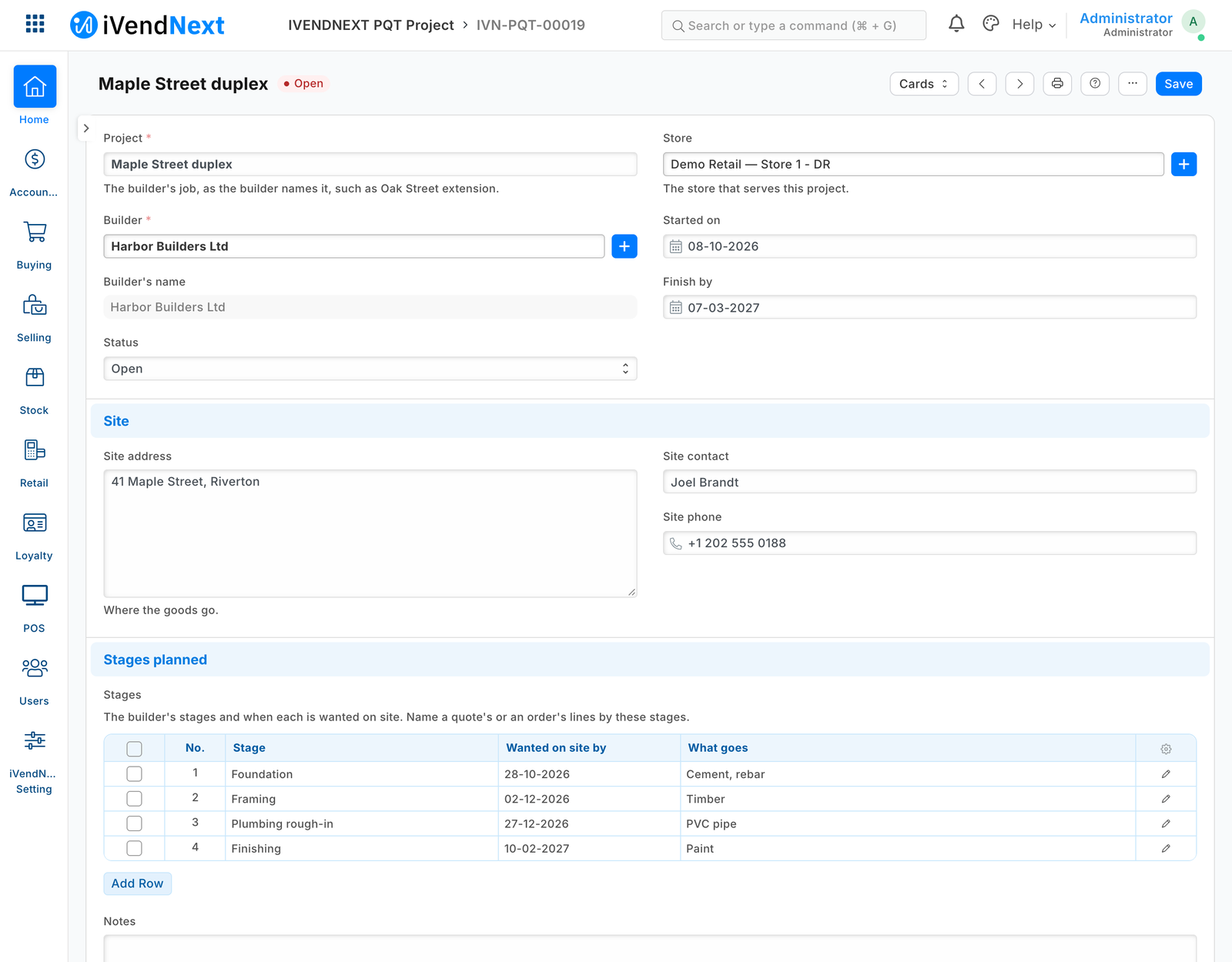
- IVENDNEXT PQT Project: the builder (a customer), the site address and contact, the dates, and the stages planned with the date each is wanted on site.
- A Project field on Quotation, Sales Order, Delivery Note, Sales Invoice and, under its own name, POS Invoice; a Stage on the quote's, order's and delivery's lines. Create carries both.
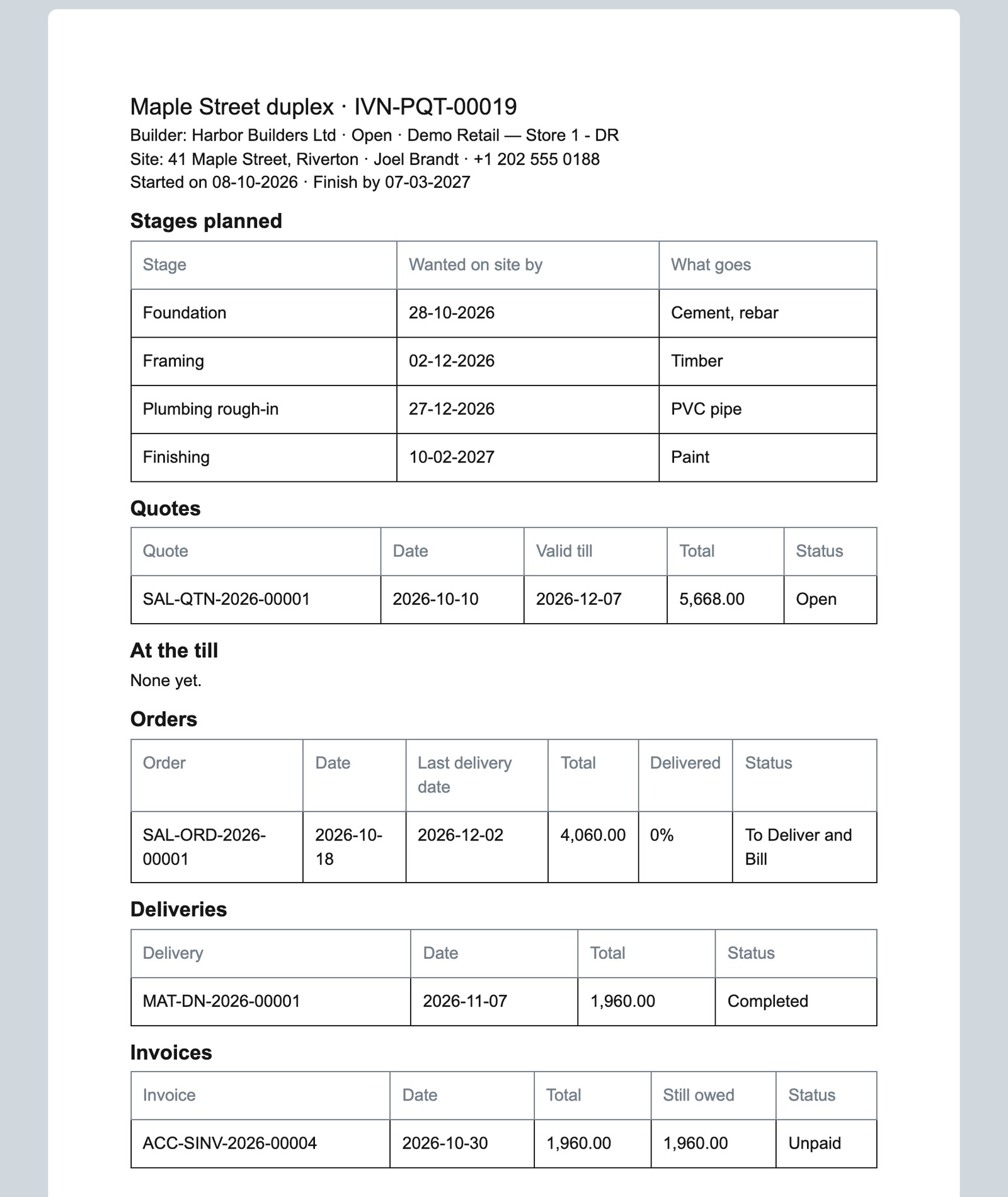
- The project sheet lists its quotes, till documents, orders with the share delivered, deliveries and invoices, as each person may read them. Each list filters by project.
How to set it up
- Give the trade desk Sales User: they keep projects, quotes and orders. Stock User and Accounts User read projects.
- A sale or order rung at the till: once booked, an Accounts User opens it under POS Invoice and chooses its Project. The trade desk names a till order's Sales Order.
- For deliveries still to come by line: Sales Order, Report view, filter Project and % Delivered, add Stage and Delivery Date, save it.
Good to know
- The app calls nothing outside and moves no money or stock: quotes, deposits and deliveries in parts stay as iVendNext does them.
- It does not use the hidden ERP Projects module, which iVendNext switches off with its roles.
- Uninstalling removes the projects, the Project and Stage fields and which project each document named; its export keeps the projects. The sheet prints its documents' dates as year-month-day.
- Adds
- 1 new list · 8 new fields on 8 record types · 1 print layout · 1 link between records
- Used by
- Sales User, Sales Manager, Stock User, Accounts User, Retail Manager
- Licence
- Apache-2.0
Version and changes
Version 1.0.0 · 30 Oct 2026
1.0.0 (30 Oct 2026): First listed version.
Need it your way?
An iVendNext partner can tailor this app to how your stores work: your own fields, rules and screens, delivered to your site alone. Ask your partner, or ask us through Help to introduce one in your region.
For builders: this app's code is open in the Partner Kit (Apache 2.0) · The code · How to make it your own
Related apps
Counter hardware
Connects the counter's cash drawer, receipt printer and customer pole display to the till. Set up each counter once in Desk; the counter's computer runs QZ Tray.
Age-restricted sale check
For alcohol, tobacco, vapes and other restricted goods: the till shows the date of birth to check at the scan, records the ID check on the sale, and refuses Pay without it.
Alterations and made-to-measure tickets
A ticket for each alteration and made-to-measure piece, from the counter to the hand-over: the garments and the work, measurements, fittings, a slip with a garment tag, and the tickets due.
Click and collect
A Desk board for the web orders a store must pick and hand over: the web orders still to pick, and on each delivery note who collected it. Nothing leaves your shop.