
What it does
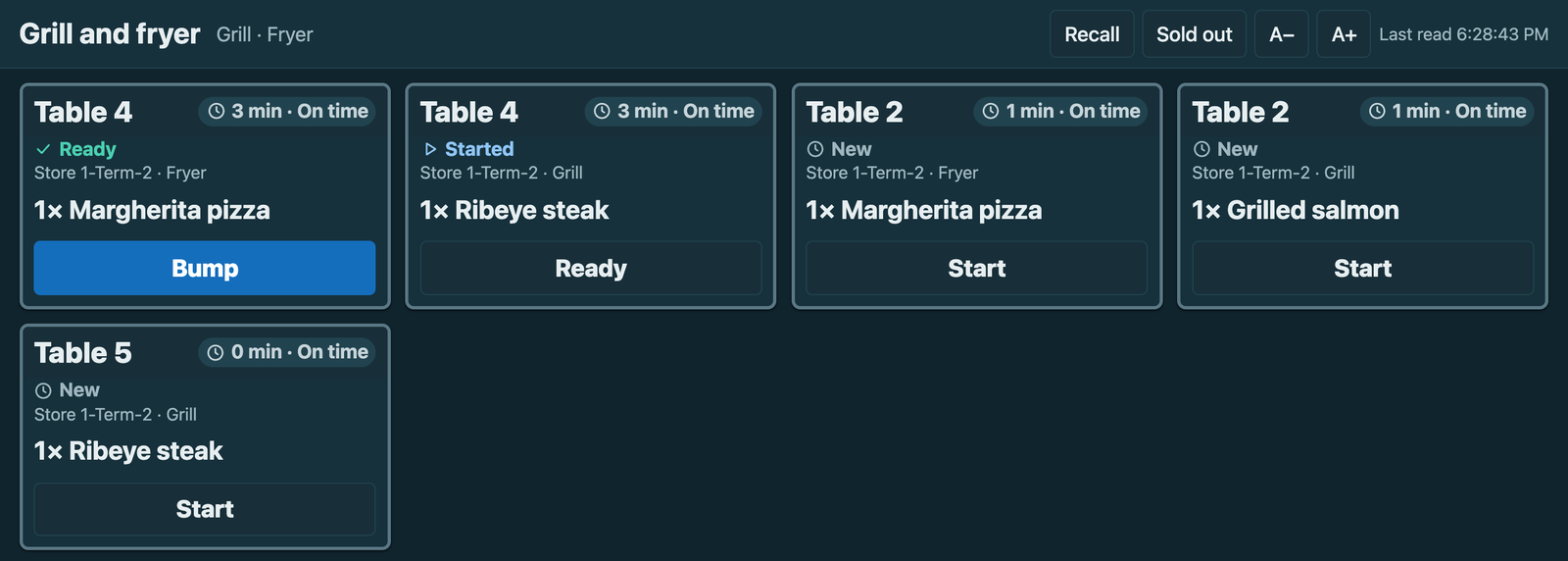
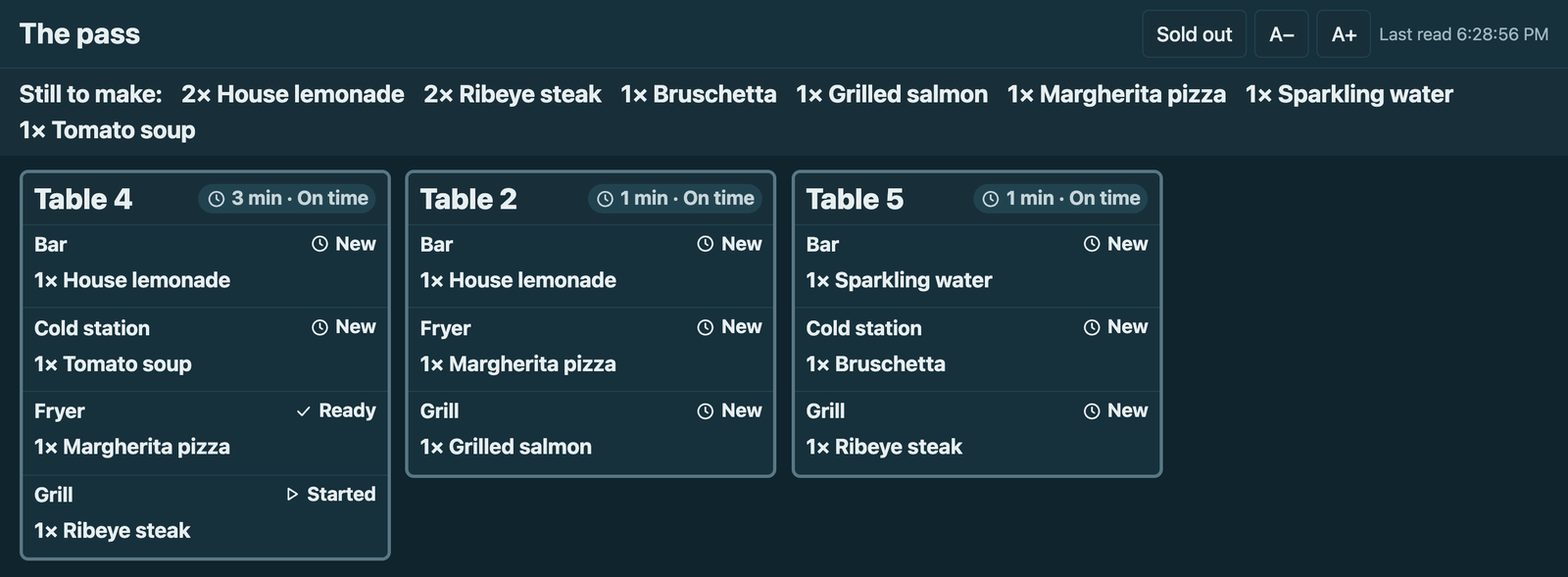
When a till presses Send, each station's ticket shows on its own screen, oldest first, with how long it has waited; the pass and the counter see what is ready.
What it does
- A station screen: its stations' tickets with the table or call number, each dish, its choices, the guest and course, the note and the allergen line; one tap moves a ticket started, ready, bumped; a void shows its dishes struck through; recall shows the last 30 minutes.
- Tickets size with the screen; A− and A+ make them smaller or larger there.
- The expo: each order's tickets together, what is still to make, and Bump order when every station is ready.
- The Now serving board: the call numbers preparing and ready, for guests.
- Sold out: a cook marks a dish of the screen's own stations sold out at that store, and the tills stop selling it.
How to set it up
- Each kitchen station needs a printer row on the register that sends: a ticket reaches the screens when its printer takes it.
- On the user ivendnext_ksc@integration.invalid: keep Is Desk User, tick Is POS User, choose a Shift Profile, link a Retail Permission with May Work a Kitchen Screen only (untick any other right it came with), add each store once with a register there, Save, then Generate Keys.
- For sold out only: give IVENDNEXT KSC Integration Read, Write and Create on Retail Item Availability. Fill IVENDNEXT KSC Settings per store; switch on the service and the Make link button; press Connect again if asked.
- Give IVENDNEXT KSC Manager, with Select on Kitchen Station and Warehouse, to whoever makes screens. Make a screen per station, the pass and the board, press Make link, and open each link on its screen, full screen.
Good to know
- Screens call kitchen-screen.ivendnext.app and, when on, kitchen-screen-live.ivendnext.app (CitiXsys); they read your tickets every few seconds, move them via your till and keep nothing.
- A leaked link: press Make link again on that screen. Tickets printed while the store is offline stay on paper.
- The item-availability right covers every store; the app marks only the screen's own. A dish cleared at one store keeps that store's row, which wins over a later sold out for every store.
- Adds
- 2 new lists · 3 new fields on IVENDNEXT KSC Screen · 1 event feed · 1 till extension · 1 Desk button
- Used by
- IVENDNEXT KSC Manager, System Manager
- Licence
- Apache-2.0
Version and changes
Version 1.1.0 · 30 Oct 2026
1.1.0 (30 Oct 2026): Sold out names each dish.
Need it your way?
An iVendNext partner can tailor this app to how your stores work: your own fields, rules and screens, delivered to your site alone. Ask your partner, or ask us through Help to introduce one in your region.
For builders: this app's code is open in the Partner Kit (Apache 2.0) · The code · How to make it your own
Related apps
Counter hardware
Connects the counter's cash drawer, receipt printer and customer pole display to the till. Set up each counter once in Desk; the counter's computer runs QZ Tray.
Age-restricted sale check
For alcohol, tobacco, vapes and other restricted goods: the till shows the date of birth to check at the scan, records the ID check on the sale, and refuses Pay without it.
Alterations and made-to-measure tickets
A ticket for each alteration and made-to-measure piece, from the counter to the hand-over: the garments and the work, measurements, fittings, a slip with a garment tag, and the tickets due.
Click and collect
A Desk board for the web orders a store must pick and hand over: the web orders still to pick, and on each delivery note who collected it. Nothing leaves your shop.