
Liquor excise returns
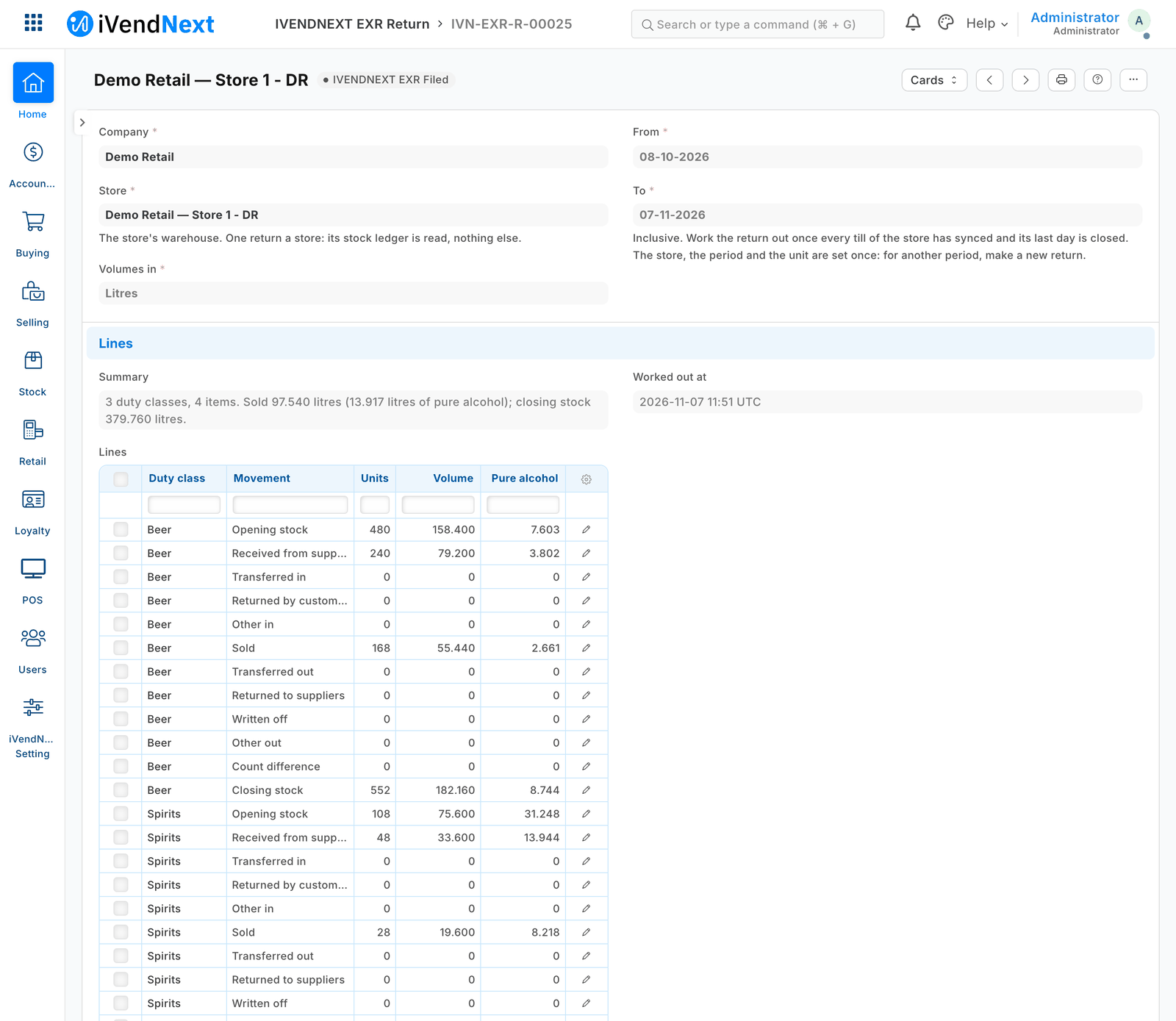
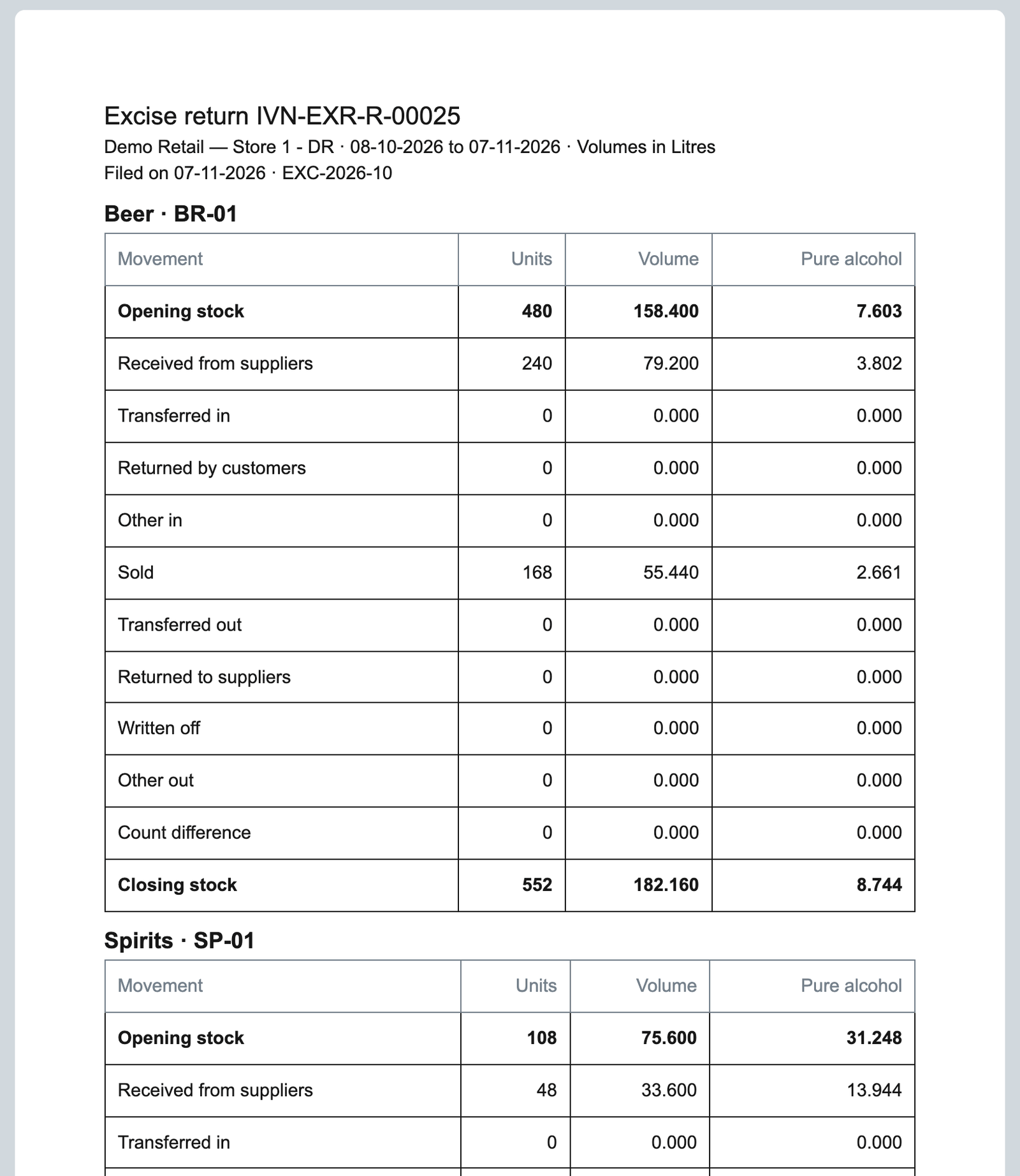
Your excise return's figures from your own stock: volume and pure alcohol per duty class, per store and period, worked out from your sales, receipts, transfers, write-offs and counts, and kept as filed.
What it does
Give each liquor item its duty class, millilitres and strength; each return then lists what your store had and what moved, in volume and pure alcohol.
What it does
- Duty classes with your authority's codes; on Item, each product's class, millilitres per stock unit and strength.
- Work out the return: per duty class, opening stock, received, transferred, sold, returned, written off, count difference and closing stock, from the store's stock ledger. Litres or US gallons.
- A worksheet to print, one table per class. A return's store and period are set once; File is the Stock Manager's step, and a filed return is locked.
How to set it up
- The install makes the app's own user (API only, role IVENDNEXT EXR Integration) and your site connects it. It gets read on Stock Ledger Entry, Stock Entry, Item and Retail Save Rule (POS 2.1.0.691 or later; before it, give them yourself).
- In Retail Save Rule, switch on IVENDNEXT EXR return locked once filed: Work out the return refuses while it is off.
- In Retail Extension Subscription, open Liquor excise returns work out: read, tick the consent, switch on. Switch on the Retail Desk Action Work out the return.
- Make your duty classes and fill the three fields on each liquor item. Stock User works returns out; Stock Manager files them.
Good to know
- Each press sends the user and return name to liquor-excise-returns.ivendnext.app (CitiXsys, US); it reads the store's stock totals, entries' types, items and the lock rule, and writes the return; never a customer, price or money.
- Close each till's last day of the period before midnight: its sales count in the period the day is closed. Duty rates and your authority's own form are a partner's version.
- Adds
- 2 new lists · 3 new fields on Item · 1 print layout · 1 approval flow · 1 event feed · 1 till extension · 1 Desk button · 1 check when saving
- Used by
- Stock User, Stock Manager, Item Manager
- Licence
- Apache-2.0
Version and changes
Version 1.0.1 · 7 Nov 2026
1.0.1 (7 Nov 2026): The install gives the app's user its rights (POS 2.1.0.691).
1.0.0 (31 Oct 2026): First listed version, hosted by CitiXsys.
Need it your way?
An iVendNext partner can tailor this app to how your stores work: your own fields, rules and screens, delivered to your site alone. Ask your partner, or ask us through Help to introduce one in your region.
For builders: this app's code is open in the Partner Kit (Apache 2.0) · The code · How to make it your own
Related apps
Expiry and recall
A recalled lot blocked at every online till at once, its stock and customers found, disposal with the regulator's visit on record if you ask for it, short-dated deliveries refused at goods-in.
UAE tax invoice receipt
The till's receipt laid out as a UAE tax invoice, in English beside Arabic: your tax registration number, each line's VAT rate and the taxable value at each rate.
Regulated stock register
Your market's legal books for controlled medicine, kept by the POS: each sale or receipt written once, numbered, never edited, printed in a starting layout. Mexico, Nigeria and Ghana here; five more markets through your partner.
Pharmacy counter rules
A prescription line paid only against the patient's valid prescription, by a licensed pharmacist or at the till they send it to; caps held; dispensed medicine returned only where its schedule allows.